

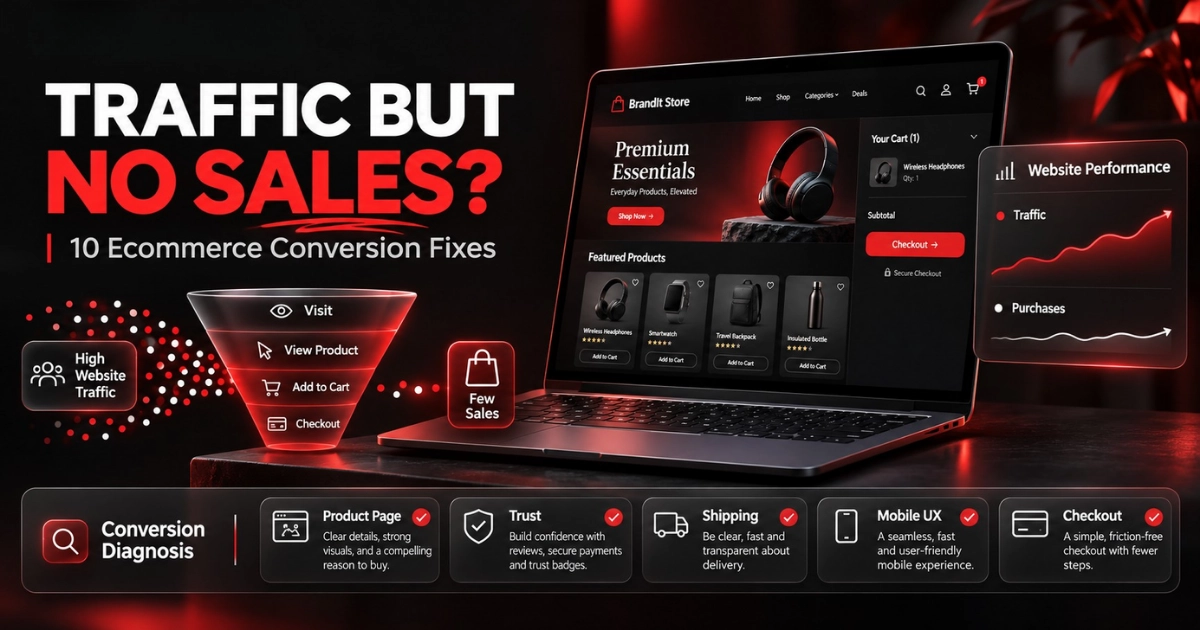
Your ecommerce store is getting visitors. Products are being viewed. Marketing is driving traffic. But the orders are not following. If that sounds familiar, the problem may not be traffic at all — it may be what happens after someone lands on your store.
When an ecommerce website gets traffic but few or no sales, the most useful approach is to find where customers are dropping out: product discovery, product page, trust, cart, shipping or checkout. Fix the biggest leak before spending more to send additional visitors into the same journey.
Where Is Your Ecommerce Store Losing Customers?
A sale is the result of several smaller decisions. A shopper has to move successfully through each stage of the buying journey.
If thousands of visitors arrive but very few progress from one stage to the next, simply increasing advertising spend can make the underlying problem more expensive.
Cart abandonment is normal in ecommerce, but not every abandonment is unavoidable. Baymard Institute's current research identifies issues such as unexpected extra costs, slow delivery, lack of trust, forced account creation, complicated checkout flows, website errors and inadequate payment options among the reasons shoppers fail to complete purchases.
Ecommerce Traffic but No Sales? 10 Things to Fix
Do not redesign everything at once. Diagnose each stage of the conversion journey and prioritise the issues most likely to be affecting purchase confidence.
Make Sure You're Attracting the Right Traffic
Not all traffic has equal buying intent. A campaign can generate impressive click numbers while attracting visitors who are curious rather than genuinely interested in buying.
Review where visitors are coming from. Search traffic, Meta Ads, TikTok, influencers, email and organic social can all produce very different customer behaviour.
If an ad promises one thing and the landing page communicates something different, conversion usually suffers even if the campaign generates inexpensive clicks.
Improve Your Product Page
A product page has one core job: give the customer enough information and confidence to make a buying decision.
Weak product pages often rely on a few generic photographs, basic manufacturer descriptions and an Add to Cart button. That may not be enough for someone discovering the brand for the first time.
Your page should quickly explain what the product is, why it matters, who it is for and why the customer should choose it from you.
- Clear product title
- Strong value proposition
- High-quality product imagery
- Benefit-led copy
- Key specifications
- Delivery information
- Returns information
- Visible call to action
Give Shoppers a Reason to Trust Your Store
Trust becomes particularly important when customers have never heard of your brand before.
A shopper may like the product and still leave because the store feels unfinished, anonymous or risky.
Trust is created across the whole experience rather than through one badge placed beneath the Add to Cart button.
- Professional visual design
- Consistent branding
- Customer reviews
- Clear contact information
- Delivery expectations
- Returns policy
- Secure payment options
- Real company information
Baymard's latest abandonment research identifies lack of trust with payment information as one of the reasons shoppers abandon checkout.
Check Whether Your Offer Is Actually Competitive
A beautiful store cannot completely compensate for an offer customers do not find compelling.
The issue may be the product itself, perceived value, positioning, price, shipping terms or the lack of a meaningful reason to purchase from your store rather than a competitor.
This does not automatically mean you need to discount.
Stronger value can come from bundles, better guarantees, clearer benefits, better presentation, free shipping thresholds, useful bonuses or a stronger reason to believe in the product.
Make Shipping Costs and Delivery Times Clear
Unexpected costs late in checkout are one of the most damaging forms of ecommerce friction.
Customers should not need to begin checkout simply to discover what delivery will cost or how long their order might take.
Where possible, communicate delivery information early on product pages, announcement bars, cart drawers and dedicated shipping information.
If you offer free delivery above a threshold, make that benefit visible before checkout.
Fix the Mobile Buying Experience
An ecommerce store can look excellent on desktop while becoming frustrating on a phone.
Check the store as a real customer would: browse a collection, open a product, select a variant, add it to the cart and complete checkout using a mobile device.
- Readable product text
- Large tap targets
- Simple navigation
- Easy variant selection
- Visible Add to Cart button
- Fast-loading images
- Usable cart drawer
- Simple checkout forms
Improve Website Speed and Stability
Performance affects both user experience and the overall quality of the shopping journey.
Oversized images, excessive apps, third-party scripts, poorly implemented page builders and unnecessary animations can all make an ecommerce store feel slower than it needs to be.
Google's current Core Web Vitals guidance recommends aiming for a Largest Contentful Paint within 2.5 seconds, Interaction to Next Paint below 200 milliseconds and Cumulative Layout Shift below 0.1.
Source: Google Search Central — Core Web Vitals
Simplify the Cart and Checkout
Every unnecessary step between purchase intent and payment creates another opportunity for the customer to leave.
Baymard's latest research reports that shoppers abandon purchases because of issues including forced account creation, long or complicated checkout flows, site errors and insufficient payment options.
Review the full checkout yourself and remove anything that is unnecessary.
- Guest checkout where possible
- Clear total cost
- Minimal form fields
- Visible delivery details
- Multiple payment methods
- No surprise fees
- Simple error handling
- Strong mobile usability
Check Your Payment Options
Customers increasingly expect familiar, convenient ways to pay.
Depending on your market and platform, that may include major debit and credit cards alongside options such as PayPal, Apple Pay, Google Pay, Shop Pay or relevant buy-now-pay-later providers.
You do not necessarily need every payment option available, but restricting customers to unfamiliar or inconvenient payment methods can introduce unnecessary friction.
Make Sure Your Tracking Is Telling the Truth
Sometimes a store appears to have a conversion problem when part of the issue is inaccurate measurement.
Before making major decisions, confirm that ecommerce events are actually recording correctly across your analytics and advertising platforms.
- Product views
- Add to cart events
- Checkout initiation
- Purchases
- Revenue values
- Traffic sources
- Campaign attribution
- Device breakdown
If the purchase event fires twice, misses orders or reports the wrong value, optimisation decisions can quickly become unreliable.
Diagnose the Problem Before You Spend More
Different ecommerce symptoms point towards different parts of the funnel. Use this as a starting diagnostic rather than assuming advertising is always the problem.
| What You're Seeing | Likely Area to Investigate | Check First |
|---|---|---|
| Lots of traffic, very few product views | Landing page / navigation | Traffic relevance, homepage clarity, collection navigation |
| Product views but few Add to Carts | Product page / offer | Images, copy, pricing, trust, value proposition |
| Many Add to Carts but few checkouts | Cart friction | Shipping costs, delivery time, discounts, cart UX |
| Checkout starts but few purchases | Checkout / payment | Errors, fees, payment options, account requirements |
| Desktop converts, mobile doesn't | Mobile UX / performance | Speed, navigation, buttons, forms, sticky elements |
| Sales shown in Shopify but not Ads/Analytics | Tracking | Pixel, GA4, event configuration and attribution |
Metrics You Should Watch Instead of Traffic Alone
Sessions tell you how many visits you received. They do not tell you why people did or did not buy.
Helps identify whether product pages are creating enough purchase intent.
Shows how effectively shoppers progress from checkout initiation to purchase.
Helps assess bundling, cross-sells, pricing and overall customer value.
Compare mobile and desktop behaviour to identify UX or performance problems.
DayFlow: When Traffic Wasn't the Real Problem
DayFlow began with an ecommerce store that lacked clear positioning, trust signals, strong product presentation and a structured buying journey. That meant the traffic reaching the website was being wasted.
The objective was therefore not simply to send more visitors. BrandIt rebuilt the store around stronger visual credibility, product presentation, trust and conversion-focused structure.
It is a useful reminder that acquiring traffic and converting traffic are two different problems.
View the DayFlow ecommerce case study →Should You Spend More on Ads if Your Store Isn't Converting?
Usually, not immediately.
Advertising can amplify a good ecommerce journey, but it can also amplify an inefficient one.
If your product pages are unclear, mobile experience is frustrating, shipping information is hidden or checkout is causing customers to leave, increasing ad spend may simply purchase more sessions that encounter the same problems.
Before asking “How do we get more traffic?”, ask “What happens to the traffic we already have?”
If clicks are coming specifically from Facebook or Instagram ads but sales are missing, the issue may also involve campaign targeting, tracking or creative alignment. That requires looking at both the advertising side and the store itself.
What Should You Fix First?
Avoid changing ten things at the same time. Prioritise obvious friction first, then measure whether customer behaviour improves.
Verify Tracking
Make sure sessions, Add to Cart, checkout and purchase events are being measured accurately before using the numbers to make decisions.
Fix Major Friction
Address obvious product-page, trust, shipping, mobile and checkout issues that could prevent customers from completing a purchase.
Test & Measure
Monitor behaviour after each meaningful change rather than relying purely on personal preference or redesigning without evidence.
A Simple Ecommerce Conversion Audit
If your store is receiving traffic right now, start with these practical checks:
- Open your store on a real phone
- Test your best-selling product page
- Make a real test purchase
- Check delivery information visibility
- Review your returns policy
- Check customer reviews and trust signals
- Test all major payment methods
- Review Add to Cart behaviour
- Check analytics purchase events
- Compare mobile vs desktop performance
- Review competitor product pages
- Check whether ads match landing pages
Even this basic audit can uncover obvious conversion blockers that are difficult to notice when you work on the store every day.
Final Thoughts: More Traffic Is Not Always the Answer
If your ecommerce website gets traffic but no sales, do not immediately assume you need a larger advertising budget.
First determine where the buying journey is breaking.
The problem may be low-intent traffic, weak product presentation, insufficient trust, an uncompetitive offer, unclear shipping, poor mobile UX, slow performance, checkout friction, payment limitations or inaccurate tracking.
Sometimes several of these issues exist at the same time.
The goal is not simply to increase website traffic. It is to turn more of the right visitors into customers.
Your Store Should Do More Than Look Good
BrandIt designs and develops conversion-focused ecommerce experiences built around stronger product presentation, customer trust, mobile usability and a clearer path to purchase.
Explore More Growth Resources
Frequently Asked Questions
Why is my ecommerce website getting traffic but no sales?
Common causes include low-intent traffic, weak product pages, insufficient trust, poor value perception, unexpected shipping costs, slow mobile performance, checkout friction, limited payment options or inaccurate tracking. The best approach is to identify where visitors are leaving the buying journey before making major changes.
How much traffic do I need before expecting ecommerce sales?
There is no universal traffic number that guarantees sales. Traffic quality, product demand, price, brand trust, conversion rate and purchase intent all matter. A smaller number of highly relevant visitors can produce more sales than a much larger volume of low-intent traffic.
Why are customers adding products to cart but not buying?
High cart activity with low purchase completion can indicate unexpected delivery costs, long delivery times, trust concerns, discount-code friction, limited payment options or a complicated checkout. Review the cart and checkout journey from the customer's perspective.
Can a slow website reduce ecommerce sales?
Poor loading performance and responsiveness can create friction throughout product discovery and checkout, particularly on mobile devices. Ecommerce stores should optimise images, scripts, apps and theme performance while monitoring real-world Core Web Vitals.
Should I redesign my Shopify store if it isn't converting?
Not automatically. First identify the actual conversion problems. Sometimes targeted improvements to product pages, navigation, trust signals, mobile UX or checkout are enough. A larger redesign becomes appropriate when the overall structure, branding or buying journey is fundamentally weak.
Should I run more ads if my store has traffic but no sales?
Usually you should diagnose the current traffic first. Increasing advertising spend while major conversion problems remain can simply increase the amount spent sending visitors into an inefficient buying journey.
What is ecommerce conversion rate optimisation?
Ecommerce conversion rate optimisation, or CRO, is the process of improving the store experience so a greater proportion of relevant visitors complete valuable actions such as adding products to cart, beginning checkout or making a purchase.
Can BrandIt improve an existing ecommerce store?
Yes. BrandIt can work on existing ecommerce stores as well as new builds, including Shopify design and development, conversion-focused UX, product presentation, mobile experience, performance and wider digital marketing strategy.